Your schedule may look perfect on paper, but anyone working in an operational environment knows reality often plays out differently. A production line that comes to a halt due to understaffing, a care unit that’s just short of hands during the morning rush, or a team that’s consistently overstaffed during quiet periods. Often, there’s one common cause: the schedule doesn’t adequately take into account what your organization truly needs at any given moment.
Staffing requirements solve exactly that. It may sound technical, but it’s one of the most effective ways to make your workforce planning smarter, more stable, and more predictable — whether you work in manufacturing, healthcare, retail, logistics, or public services.
What are staffing requirements?
Organizations often plan based on availability or “how things have always been done.” But effective staffing doesn’t start with who can work — it starts with what the work requires. That starts with analyzing the workload: what tasks need to be performed, which skills or qualifications are necessary, how the volume fluctuates throughout the day, and which moments are critical for quality or safety.
Only then do you define how many employees, with which qualifications, in which location and at what time are needed. These agreements are called staffing requirements. They’re not extra rules, but a guiding framework for workforce planners. They form the foundation of any realistic workforce schedule.
You don’t just work with a desired staffing level, but also with a minimum (required for safe execution), a standard level (optimal staffing based on average workload), and a maximum (to prevent waste and overstaffing). This makes workforce planning less guesswork and more of a strategic process.
Why staffing requirements make a real difference
Staffing requirements change the way you think about staffing. They bring calm and rhythm to your schedules. You not only prevent chronic understaffing, but also overstaffing — which can be just as costly. Teams start their day with the right staffing, peak periods are supported instead of barely managed, and you avoid last-minute scheduling chaos.
Equally important: staffing requirements ensure the right skills are present at the right time. No shift starts without proper qualifications, no counter runs without experienced staff, no care unit functions without medication authorization. This improves both quality and safety.
And one more thing: if you want to apply modern forms of workforce planning — forecasting, automated scheduling, skills-based scheduling, or even self-scheduling — you need staffing requirements. They’re the backbone of any innovative planning model.
Why software is essential
Manually managing staffing requirements is nearly impossible in practice. Excel sheets, scattered notes, forgotten qualifications, sticky notes on screens… planners spend hours on details, and still errors sneak into the schedule. Resulting in understaffing, overstaffing, or gaps.
That’s why modern workforce management software converts staffing requirements into concrete, manageable parameters that are visible during planning. You don’t just see what needs to be scheduled, but also why. It becomes an essential visual tool to check whether you’re under, at, or over staffing — per task, per shift, per activity, for any day or period you define.
How Planpoint smartly uses staffing requirements
In Planpoint, your staffing requirements are literally placed underneath your planning board. This makes scheduling not only easier, but also much more reliable. You immediately see where there’s understaffing, where you’ve scheduled too many people, and where your planning aligns perfectly with what the organization needs. You don’t have to count or cross-check anything: the system automatically compares the need with what’s scheduled. This requirements board shows in real time:
- how many employees you need
- which qualifications are required
- how many shifts of a certain type are needed
- which activities or activity types need to be staffed
- and whether your current plan meets those needs
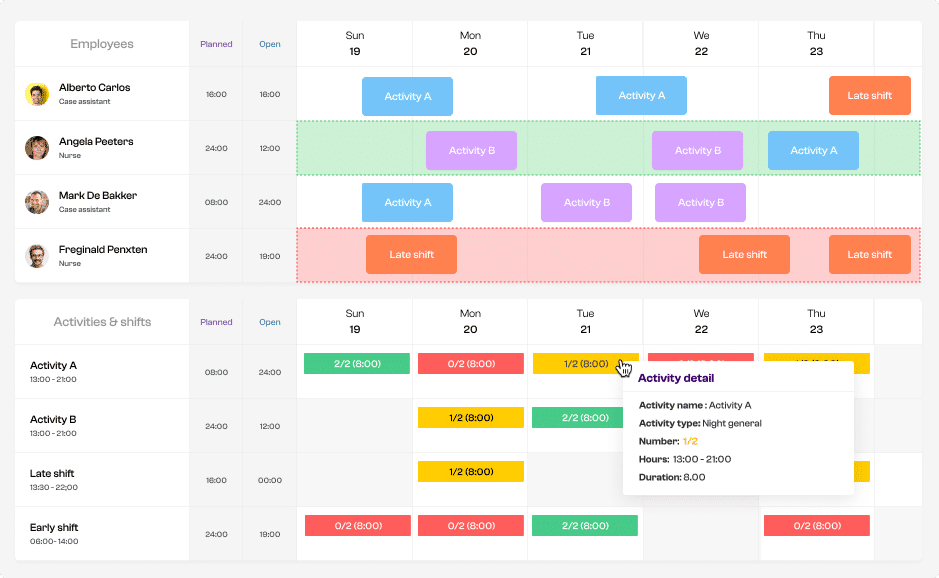
Planpoint calculates all of this fully automatically based on scheduled staff, qualifications, and the staffing requirements you set — per day, period, or shift.
The best part? From this requirements board, planners can drag and drop services or tasks directly onto the planning board. So you’re literally planning based on need. No switching tabs, no duplicate work, no parallel lists. Everything is in one place. Planpoint supports four types of staffing requirements:
- activities: staffing for a specific task or workstation
- activity types: grouped tasks of the same kind
- qualifications: required skills or certifications that must be present
- categories: a combination of activities or qualifications
For each type, you can set minimum, standard, and maximum levels. On the schedule board, Planpoint compares the staffing requirements with the actual schedule, and color codes instantly show where you’re under-, over-, or perfectly staffed. Planners no longer need to count or verify — the system does it for them.
Even when a team or department combines multiple activities or when qualifications vary widely, the planning board remains clear thanks to filters by activity, type, qualification, category, or period.
Some examples:
- Manufacturing – senior operators: Every Monday from 08:00 to 14:00, at least three senior operators are needed in department A, each with a reach truck certificate.
- Healthcare – medication authorization: For the morning shift, at least one level 5 nurse and three care workers are required, one of whom must have medication authorization.
- Retail – evening peak: From 16:00 to 19:00, at least five cashiers must be scheduled, including two lead cashiers.
- Public sector – service desk: During opening hours, at least two front-desk staff must be present: one administrative employee and one civil services employee.
- Technical services – aerial platform: During on-call shifts, at least one technician with an aerial platform certificate is required, plus one additional support staff member.
What are the benefits?
Staffing requirements form the foundation of a realistic, fair, and predictable schedule. With Planpoint, that logic becomes tangible every day.
- more stable schedules
- fewer last-minute emergencies
- fewer last-minute changes
- better staffing during peak times
- higher service quality
- greater peace of mind for planners and teams
- better forecasting
- more transparency for staff
Especially in manufacturing, healthcare, logistics, retail, and public services, this makes a daily difference on the work floor.
Want to know how staffing requirements can boost your planning?
We’d love to show you how Planpoint turns staffing requirements into a predictable, efficient, and stable schedule. Book a demo, or request a quick scan — we’ll review your current planning process and explore where improvements can be made.