
Smart self-scheduling software
Employees can submit their preferences, view schedules and swap shifts themselves – all within the agreed guidelines. Planpoint supports every step of the process and automatically monitors staffing levels, compliance requirements and approvals.
















Flexible for employees, structured for your organisation.
With Planpoint, employees are empowered to actively participate in the scheduling process – fully online, transparent and within the boundaries you define.
Self-scheduling with Planpoint
Flexibility for your employees, control for you. Planpoint turns self-scheduling into a manageable and transparent process. Your team can digitally submit their availability and preferences, select open shifts or swap shifts with colleagues. Meanwhile, you stay in control with automatic checks on rules, staffing levels and approvals.
- Employees manage their own schedules through the app or portal
- Fair and transparent self-scheduling in three phases
- Staffing requirements, rules and preferences are automatically monitored
- Shift swaps are handled fairly through smart approval workflows
- Managers retain full visibility and can intervene when needed
How does self-scheduling work in Planpoint?
As an organization, you define the staffing needs per period—based on shifts, qualifications, or coverage requirements. Employees then go through three phases to create their own schedule.

Phase 1: My ideal schedule
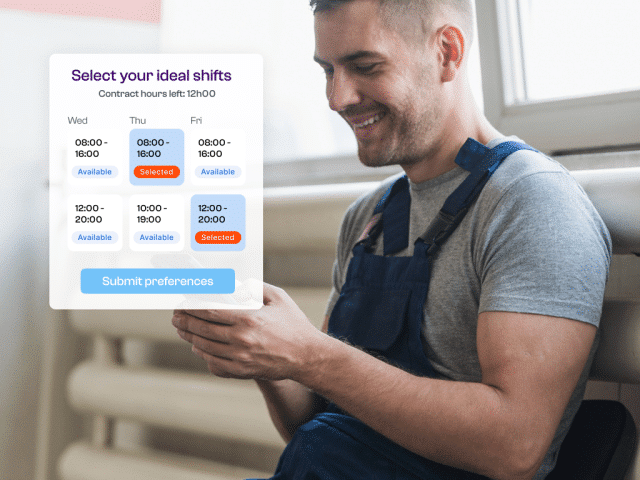
In the first step, each employee creates their ideal schedule for the upcoming planning period. Employees can indicate their preferred shifts, days off, leave requests and contract hours.
In addition, employees can specify when they prefer not to work by setting veto days. All of this can be done easily from home via the website or the Planpoint mobile app, either individually or together with their family.
Phase 2: Adjustment phase
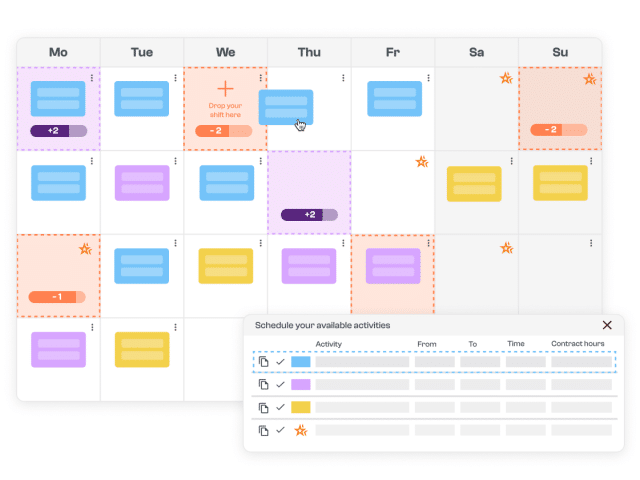
In the second step, the overall picture becomes visible. Based on all submitted preferences, Planpoint instantly shows where overstaffing or understaffing may occur.
Employees are then given the opportunity to actively contribute to creating a balanced schedule. They can choose additional shifts or move activities to less occupied days – all within predefined rules and approval workflows.
- Planpoint combines all preferences into one clear overview
- Employees voluntarily help resolve overstaffing and understaffing
- Additional shifts and schedule changes are managed in a controlled way
- Every team member actively contributes to the final schedule
Phase 3: The final schedule
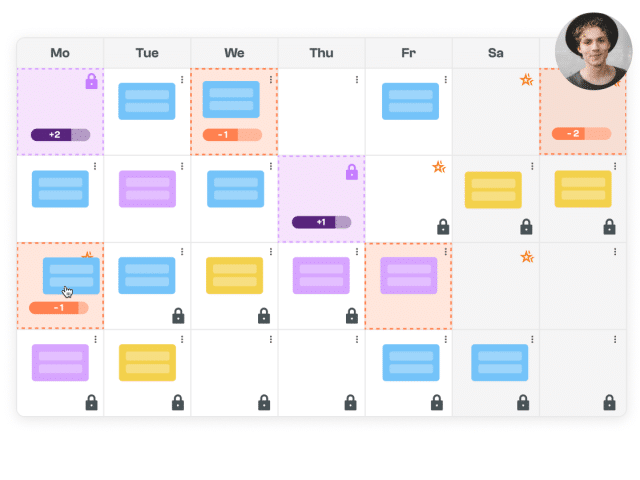
In the final step, the planner or team leader takes over. Based on the input from the previous phases, any remaining gaps in the schedule are filled and final decisions are made where needed. The result is a balanced schedule that is both complete and supported by the team.
- The planner fills remaining shifts based on availability, contract hours and veto days
- The software supports fair allocation and informed decision-making
- A points system rewards employees who actively contribute to the scheduling process
- Everything takes place within predefined rules and with full transparency
The result? A work schedule that not only works on paper, but is also embraced by the entire team.
Self-scheduling with Planpoint
More autonomy for your team, more visibility and control over workforce deployment.
Smart support
Compliance
Personalised workflows
Transparent scheduling
Increase engagement
Scalable
All your workforce management tools within reach
Explore the most important features of Planpoint—from self-scheduling and time tracking to HR. Choose only what you need.
HR & Talent Management
Time Tracking
Workplace planning
Workforce Scheduling
Employee self service
Workload intelligence

Want to see how self-scheduling works in your organization?
Get in touch with us! We would be happy to show you Planpoint in a free personalised demo.
Learn more about WFM and Planpoint

8 misconceptions about self-scheduling

What are the most common objections to self-scheduling?

What are the WFM software must-haves today?
More about software and self-scheduling
What is self-rostering?
Self-rostering is a modern approach to workforce planning where employees actively participate in creating their own schedules. Instead of simply receiving a timetable, they submit their availability, preferences, and requests. This increases engagement and fosters autonomy, while the organization ensures essential conditions are met: adequate staffing, compliance with labor regulations, and a fair distribution of shifts.
In Planpoint, this process is fully digital, with built-in validations and real-time insights for everyone involved.
Is self-rostering possible without software?
In theory, self-rostering without software is possible, for example using Excel or shared documents. But in practice, this brings significant risks.
Without specialized software, there’s no structure, automatic checks, or real-time visibility. This often leads to errors or frustrations, such as:
- double or invalid assignments
- manual mistakes when copying preferences
- no alerts for overstaffing, understaffing, or compliance issues
- lack of clarity about who was assigned which shift and why
- extra work and pressure on planners or team leads to check and fix everything
Self-rostering without software is also hard to scale. As soon as you manage multiple teams, locations, or contract types, complexity grows quickly.
With Planpoint, the entire process is streamlined and controlled. Employees submit their preferences online, while the software automatically monitors availability, compliance, and staffing needs. You save time, increase engagement, and maintain full oversight as a planner.
What are the benefits of self-rostering software?
A solution like Planpoint makes self-rostering efficient, fair, and manageable. Key benefits include:
- a structured process in clear phases
- automatic validation of legal and organizational rules
- real-time visibility for both planners and employees
- digital communication about requests and schedule changes
- more autonomy and job satisfaction for staff
- fewer last-minute adjustments and discussions
Planpoint helps organizations maximize the value of self-rostering while keeping control and structure intact.
Which organizations benefit from self-rostering with software?
Self-rostering is valuable for organizations where:
- employees work in shifts or services
- flexibility is essential
- workforce planning is time-intensive
- employee engagement and satisfaction matter
It is especially relevant in sectors like healthcare, social services, childcare, technical services, retail, and logistics. Planpoint is designed to support this diversity — including different scheduling methods.
What are the must-have features in self-rostering software?
A strong tool like Planpoint supports every step of the process. Must-have features include:
- an intuitive interface for employees (via app or browser)
- automatic validation for rules, preferences, and availability
- options for shift swaps and requests
- real-time visibility and control for planners or managers
- support for different scheduling models, such as the 3-phase model
Thanks to these features, self-rostering becomes a motivating process rather than an administrative burden.
What is the 3-phase model for self-rostering?
The 3-phase model is a structured method for self-rostering, also used in Planpoint:
- My ideal schedule – employees submit their wishes and preferences.
- Our shared schedule – employees adjust or swap shifts with colleagues if needed.
- The final schedule – the planner or manager finalizes the schedule.
This approach combines autonomy with clarity. Planpoint supports each phase digitally, with built-in validations and communication. The result is a balanced schedule that is both workable and fair.
How do you introduce self-rostering in your organization?
Self-rostering is more than just a software feature — it’s a new way of planning where employees actively help shape their schedule. A successful introduction starts with a clear strategy and proper support. Planpoint guides you step by step:
- Start with one team or a full department — you decide.
- Our consultants help define the rules, process, and communication.
- Employees get an easy-to-use interface tailored to their role.
- Planpoint supports the process in three clear phases, so everyone knows what to expect.
Thanks to built-in validations, visual feedback, and approval flows, you always stay in control. This makes self-rostering a reliable method with real employee buy-in.
Is self-rostering suitable for small teams or departments?
Absolutely. Self-rostering is not only for large organizations with hundreds of employees. Smaller teams can also benefit — precisely because mistakes, absences, or mismatches weigh heavier in such contexts.
Planpoint is highly flexible:
- Start with a single team, for example in a pilot phase.
- Set rules, filters, and approvals according to your scale.
- Employees schedule via the mobile app or web, with no extra tools needed.
- Planners keep full oversight with the visual planning board and automatic alerts.
This increases engagement, reduces change requests, and keeps scheduling manageable — even for small teams.